SERVICES
SERVICES
Preview

This is your website preview.

Currently it only shows your basic business info. Start adding relevant business details such as description, images and products or services to gain your customers attention by using Boost 360 android app / iOS App / web portal.

919819060001
video editing
services
Course DetailB.Voc.Comp
B.Voc. in Animation & Visual Effects (36 Mont ...

Course DetailB.Voc.Comprehensive Animation and Visual Effects (VFX) program to develop creative mindsPractical projects with industry-standard software.Sequential learning from fundamentals to advanced visual effects.Learn from experienced professionals in the animation industry.Graduates prepared with competitive skills and strong portfolios.animationanimationanimationB.Voc. in Animation & Visual Effects(36 Months)Learn from ProfessionalsThis comprehensive degree program covers a broad spectrum of art, design, and digital media skills. Students learn illustration, 3D modeling, rigging, animation, dynamics, and advanced visual effects using industry-standard software such as Maya, Z-Brush, Houdini, and more. The curriculum equips students with the knowledge and tools to excel in the world of digital media and visual effects production.Become a professional artistTo become a professional artist after learning the above content, master foundational skills in sketching and design, then advance to 3D modeling, animation, and visual effects. Gain expertise in software like Maya, After Effects, Nuke, Houdini, build a strong portfolio showcasing diverse projects, and stay updated with industry trends. Networking and continuous learning will solidify your career.Be Industry ReadyUpon completing this comprehensive program, students will be industry-ready by mastering essential art and design principles, 3D digital art, and advanced animation techniques. They will gain proficiency in Maya for modeling, texturing, rigging, and animation, alongside skills in dynamics, motion graphics, and visual effects. The curriculum's practical projects and hands-on experience ensure students are well-equipped to tackle real-world challenges in the animation and VFX industries.Program Highlights:Covers essential skills from basics to advanced techniques.Practical projects with industry-standard software.Sequential learning from fundamentals to advanced visual effects.Learn from experienced professionals in the animation industry.Graduates prepared with competitive skills and strong portfolios.Advanced compositing, tracking, and procedural effects mastery. ...

30-Day Adobe Premiere Pro
MASTER CLASS VIDEO EDITING PRO LEVEL

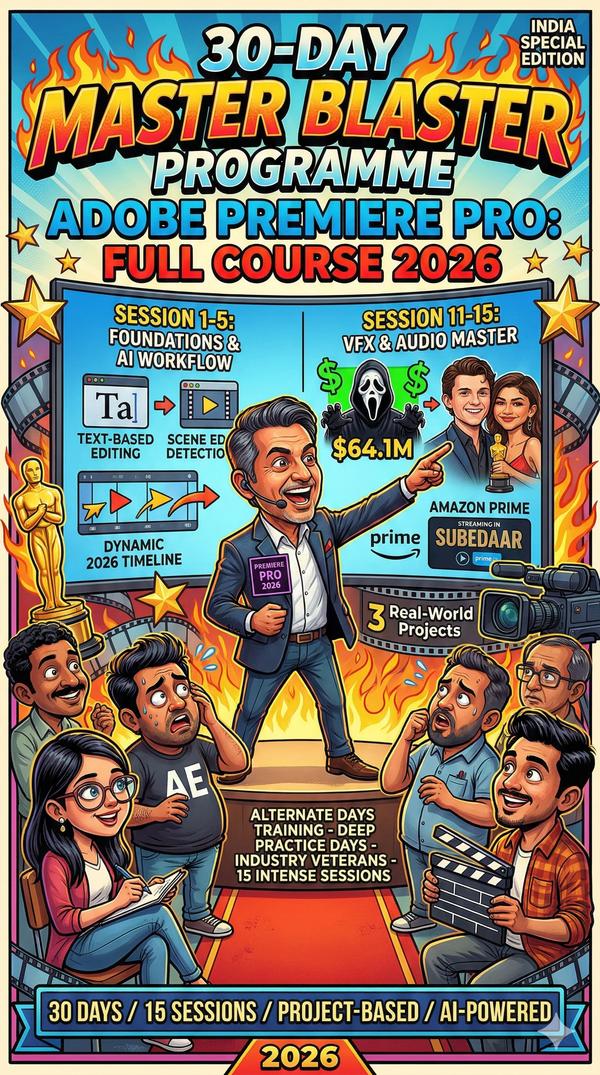
30-Day Adobe Premiere Pro Masterclass (2026 Edition)Structure: 15 Sessions | Alternate Days | Industry Veteran LedPhase 1: The Foundation & AI-Powered WorkflowDay 01: The 2026 Interface & Native AI SetupOptimizing hardware for AI rendering.Generative Extend: Using AI to fill gaps in footage and audio.Project organization & the new “Intelligent Import” window.Day 03: Text-Based Editing (The Modern Standard)Editing video by manipulating transcripts.Scene Edit Detection: Deconstructing old videos into editable clips instantly.Rough-cut assembly techniques used by news & documentary veterans.Day 05: Precision Cutting & Advanced ToolsMastering the Ripple, Rolling, Slip, and Slide tools.Advanced Trimming in the Program Monitor.Maintaining “Pacing and Rhythm” (The Veteran’s Secret).Phase 2: Visual Mastery & Cinematic TechniquesDay 07: Professional Color Correction (Lumetri Basics)Understanding Scopes: Waveform, Parade, and Vectorscope.Matching colors across different cameras (Log vs. Rec.709).The “Secondary Color” workflow for skin tones.Day 09: Cinematic Color Grading & LUTsCreating “The Look”: Teal & Orange, Noir, and Vintage.Using AI Enhanced Mask Tracking for localized grading.Shot matching and consistent grading across a timeline.Day 11: Compositing & Special EffectsKeying: Advanced Green Screen (Ultra Key) in 2026.Luma Keying: Using light values for radiant Hollywood transitions.Masking and Tracking: Blurring faces or adding motion elements.Phase 3: Audio Design & Motion GraphicsDay 13: The Essential Sound Panel & Audio AIAuto-Ducking: Instant music-to-voice balance.Speech Enhancement: Removing background noise via AI.Multichannel audio routing and mixing for 5.1/Stereo.Day 15: Motion Graphics & Essential GraphicsCreating modern Lower Thirds and Title cards.Dynamic Linking: Moving between Premiere and After Effects.Keyframing: Animating logos, text, and graphics.Day 17: Social Media & Vertical Video MasteryAuto-Reframe: Converting 16:9 to 9:16 for Reels/Shorts instantly.Captions & Subtitles: AI-generated 100% accurate transcripts.Design for mobile-first consumption.Phase 4: Advanced Projects & DeliveryDay 19: Multi-Cam & Collaborative WorkflowsSyncing 10+ cameras instantly.Frame.io Integration: Real-time client feedback and cloud collaboration.Managing heavy 4K/8K proxy workflows.Day 21: The “Nike Ad” Style ProjectFast-paced editing, speed ramping, and match-cuts.Using Gradient Wipes for professional transitions.Day 23: Documentary & Narrative ProjectStorytelling through “A-Roll” and “B-Roll” management.Advanced audio sweetening and foley design.Day 25: Troubleshooting & Project ManagementSolving “Media Offline” and cache issues.The Project Manager: Archiving and consolidating files.Day 27: Final Polish & Exporting for 2026Mastering Adobe Media Encoder.Exporting for Broadcast vs. Web vs. Digital Signage.Creating custom presets for high-efficiency delivery.Day 29: Portfolio & Industry PitchingBuilding a 60-second Showreel.Industry Veteran Q&A: How to land high-paying freelance or studio jobs.Key Course FeaturesFeatureDetailsProject-BasedWork on 3 real-world projects (Music Video, Corporate, Social Reel).Mentorship1:1 Review sessions on your “Practice Days” (the gap days).CertificationIndustry-recognized Professional Video Editor Certificate.AI Focus2026-specific training on Generative AI tools within Premiere. ...

Master the Art of Profess
Master the Art of Professional Video Editing: ...

Master the Art of Professional Video Editing: Your 3-Month Roadmap to a Creative CareerIn 2026, video is no longer just “content”—it is the heartbeat of global communication. Whether you want to edit high-energy sports highlights, cinematic music videos, or high-stakes political campaigns, the Adobe Premiere GENIUS Course is designed to transform you from a beginner into a broadcast-ready professional.Why Choose This Course?We don't just teach you where the buttons are; we teach you why to make the cut. Led by mentors with over 25 years of industry experience (from the newsrooms of CNBC and Bloomberg to top-tier sports channels), this course is built on real-world projects and decades of professional mastery.What You Will MasterOur curriculum is a deep dive into every niche of the modern media industry:Sports & Action: Learn the high-speed pacing required for sports montages and highlight reels.Corporate & Ad Films: Master the “Executive Look” for big brands and persuasive 30-second commercials.Social Media & Trending Reels: Edit native 9:16 content that stops the scroll and goes viral.Music Videos & Montages: Blend rhythmic editing with cinematic color grading.Political Campaigns: Use “Newsroom Aesthetics” to create powerful, high-impact ad campaigns.The Curriculum: From Basics to BroadcastThe Foundation: Interface mastery, managing tapeless media, and capture settings.The Edit: Cuts-only videos, dynamic titles, and specialized editing tools.The Polish: Audio sweetening, professional color grading, and compositing techniques.The Delivery: Project management, exporting for all platforms, and DVD authoring with Adobe Encore.AI vs. Skill: Why You Still Need a MentorYou might have seen “AI Editors” popping up online. Here’s the reality: AI is a tool, but you are the architect. AI can suggest a cut, but it can't feel the emotion of a song or the timing of a political speech. We teach you how to use Adobe Premiere 2026’s latest AI features (like Object Masking and AI Audio Tagging) as your assistants, so you spend less time on “robot work” and more time on creative storytelling.Ready to Launch Your Career?Don't just learn a software—master a craft. With our lifetime support and focus on industry-standard live projects, you'll be ready to take on freelance gigs or full-time roles the moment you graduate.Get Started Today: 9819060001Mastering Adobe Premiere 2026 for Career Growth This video breaks down the specific new AI tools in the 2026 update that we integrate into our 3-month genius course. ...

services